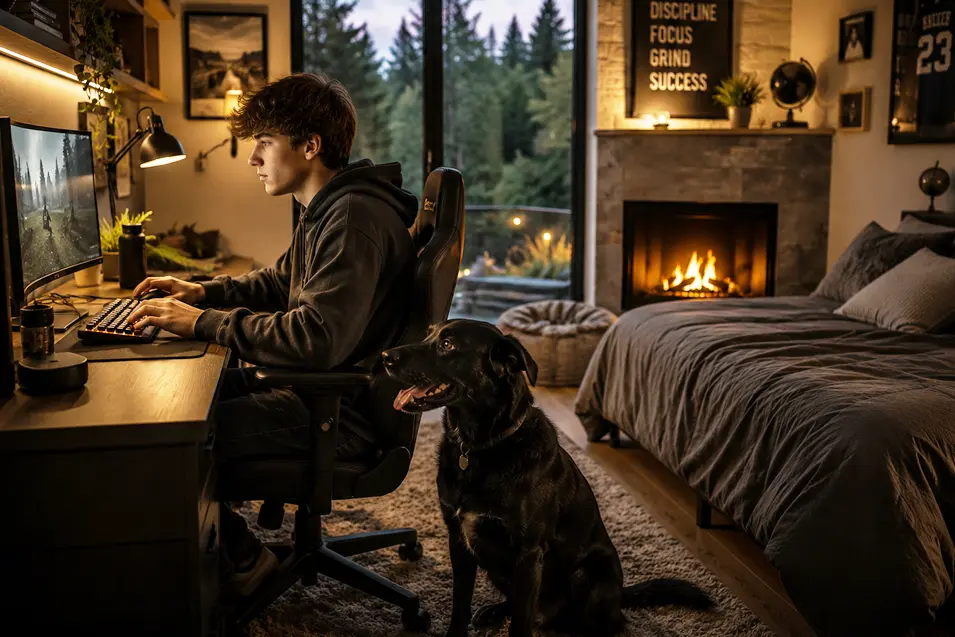
Modern gaming setups often feature powerful computers, multiple monitors, specialized lighting, expensive accessories, and enough cables to resemble a small data center. While these spaces can be exciting for gamers, they can also create unexpected hazards for pets.
Dogs and cats don’t view gaming rooms the same way their owners do. Curious pets may see dangling cables as toys, warm electronics as comfortable resting spots, or expensive equipment as obstacles standing between them and their favorite human.
Fortunately, creating a pet-friendly gaming setup doesn’t require sacrificing performance or aesthetics. With thoughtful planning and a few practical precautions, it’s possible to build a space that protects both your pets and your investment.
Why Gaming Areas Can Be Risky for Pets
Unlike many rooms in a home, gaming setups often concentrate multiple hazards in a relatively small area.
Common risks include:
- Electrical cords
- Power strips
- Hot electronics
- Small accessories
- Energy drinks
- Sharp desk edges
- Rolling chairs
Many pet owners focus on protecting their equipment from pets while overlooking the importance of protecting pets from the equipment.
A safe setup should accomplish both goals.
Manage Cable Clutter
One of the biggest safety concerns in gaming rooms is cable management.
Pets, especially puppies and kittens, are often attracted to hanging wires and exposed cords.
Chewing electrical cables can lead to:
- Serious burns
- Electric shock
- Equipment damage
- Fire hazards
Good cable management should include:
- Cable sleeves
- Cord covers
- Under-desk trays
- Wall-mounted routing systems
- Secured power strips
The fewer exposed cords a pet can access, the safer the environment becomes.
Secure Power Strips and Surge Protectors
Many gaming setups require multiple outlets, resulting in power strips being placed on floors where pets can easily access them.
Power strips should ideally be:
- Mounted off the floor
- Hidden behind furniture
- Protected from moisture
- Organized to prevent cable tangles
This reduces both safety risks and visual clutter.
Keep Drinks Away From Equipment
Gamers are notorious for keeping drinks within easy reach.
Unfortunately, pets often have a talent for knocking things over at the worst possible moment.
A curious cat jumping onto a desk or an excited dog brushing against a table can quickly send a drink into:
- Keyboards
- Consoles
- PCs
- Monitors
- Power supplies
Using secure drink holders or keeping beverages away from electronics helps protect expensive equipment while reducing hazards.
Watch Out for Small Accessories
Gaming desks frequently contain items that can become choking hazards.
Examples include:
- Thumb drives
- Batteries
- Memory cards
- Earbud tips
- Controller parts
- Cable adapters
Pets may investigate these objects out of curiosity, especially if they fall onto the floor.
Keeping accessories organized and stored properly helps prevent accidents.
Consider Desk Placement
The location of a gaming setup can influence both comfort and safety.
When choosing a location, consider:
- Pet traffic patterns
- Access to windows
- Room ventilation
- Cable routing opportunities
- Noise levels
Avoid placing setups where pets regularly run, play, or chase toys.
Creating separation between active pet areas and gaming equipment can reduce accidents.
Be Careful With RGB Lighting
RGB lighting has become a staple of modern gaming setups.
While most lighting systems are harmless, some pets may react differently to flashing or rapidly changing lights.
Certain animals may become:
- Overstimulated
- Distracted
- Anxious
- Fixated on moving light patterns
If a pet seems uncomfortable around specific lighting effects, consider switching to calmer settings or static lighting modes.
Keep Pets Away From Hot Electronics
Computers, gaming consoles, routers, and other electronics generate heat during operation.
Cats, in particular, are often attracted to warm surfaces.
While it may seem harmless, allowing pets to rest on or near active equipment can create problems such as:
- Blocked ventilation
- Overheating
- Equipment damage
- Fur accumulation
Maintaining clear airflow around electronics helps protect both the hardware and the pet.
Create a Comfortable Spot Nearby
One of the easiest ways to improve pet behavior around gaming setups is to give pets a comfortable place to relax nearby.
Many pets simply want to spend time with their owners.
Consider adding:
- A pet bed
- A blanket
- A window perch
- A quiet resting area
Providing an appealing alternative often reduces unwanted interactions with equipment.
Clean More Often Than You Think
Gaming equipment tends to attract dust, and pets contribute additional hair and dander.
Routine cleaning helps:
- Improve airflow
- Reduce overheating risks
- Extend equipment lifespan
- Maintain air quality
Regular vacuuming and dust removal are especially important in homes with multiple pets.
Building a Setup That Works for Everyone
A successful gaming setup isn’t just about performance, aesthetics, or the latest hardware.
It’s also about creating an environment that supports everyday life.
For pet owners, that means considering how animals interact with the space and making adjustments that improve safety without sacrificing enjoyment.
By managing cords, organizing equipment, reducing hazards, and creating comfortable alternatives for pets, it’s possible to enjoy gaming while maintaining a safe and welcoming home.
After all, the best gaming setup isn’t one that’s simply impressive—it’s one that works well for every member of the household, whether they spend their time behind a keyboard, on a controller, or curled up nearby watching the action.